
Automating Git Workflow: Simple to Pro with Gotchas

The Spark

My daughter is currently navigating the intense, fast-paced world of software engineering. Recently, she hit that universal developer wall—the tedium of the "Git Triple-Step." After a long session of coding, she exclaimed, "There has to be a faster way to do this. I'm tired of typing the same three commands every time I want to save my work!"

As a tinkerer who can’t resist a good challenge, I told her, "Don't worry, I’ll write you a script. One command, and you're done."

It sounded simple and it was simple. But as I quickly learned, Bash has a way of humbling even the most experienced scripters when you least expect it.


The "Simple" Script That Failed

I cobbled together a string of commands which I thought was a foolproof one-liner. I wanted the script to take her message, add the files, commit them, and push.

#!/bin/bash
msg=$1
git add .
git commit -m \"$msg\"
git push

I tested it with a single word: ./push Test. It worked perfectly. It felt real good.

Then she tried a real-world commit message: ./push "Added the new NN logic"

The Result? Disaster. The terminal started screaming: error: pathspec 'new' did not match any file(s).


The Anatomy of the "Pathspec" Bug

What went wrong? As it would happen, I had fallen into the Literal Quote Trap.

By using backslashes (\"$msg\"), I thought I was being proactive by "forcing" the quotes to stay around the message. Instead, I was telling Bash to treat the quotation marks as literal text characters rather than functional shell wrappers.

When the script executed, Git didn't see a single string. It saw:

  • -m: The flag
  • "Added: The message—including a literal opening quote
  • the, new, NN...: Git thought these were filenames I wanted to commit.

Since those files didn't exist, Git threw a "pathspec" error and died.


The Fix: Double-Quote to the Rescue

In Bash, you don't need to "force" quotes with backslashes. You just need to wrap your variable expansion in standard double quotes. This acts as the "glue" that keeps your multi-word message together, no matter how many spaces it has.


The "Pro" Solution: push.sh

After fixing the quoting bug, I decided to take it a step further. If I was going to give my daughter a tool, it should be robust, safe, and informative.

Here is the final "Pro" version of the script. It includes:

  • Branch Protection: Prevents accidental pushes to main or master.
  • Color-Coded Feedback: Green for success, Red for "Stop and Look."
  • Safety Checks: If the commit fails, it won't try to push.

The Script

#!/bin/bash

# -----------------------------------------------------------------------------
# Script Name: push
# Description: Automates the 'git add .', 'git commit', and 'git push' workflow
#              with built-in branch protection and error handling.
# Developer:   Mukul Dharwadkar
# License:     MIT (Open Source - Please retain developer credit)
# -----------------------------------------------------------------------------

# --- CONFIGURATION ---
# Colors for high-visibility feedback
GREEN='\033[0;32m'
RED='\033[0;31m'
YELLOW='\033[1;33m'
NC='\033[0m' # No Color

# --- HELP MENU ---
function show_help {
    echo -e "${YELLOW}push - Automated Git Workflow${NC}"
    echo -e "Developed by: Mukul Dharwadkar"
    echo -e ""
    echo -e "${YELLOW}Usage:${NC} ./push \"Your commit message\""
    echo -e "Example: ./push \"Refactored navigation bar CSS\""
    exit 1
}

# 1. Validation: Ensure a message was provided
if [[ "$1" == "-h" ]] || [[ "$1" == "--help" ]] || [[ -z "$1" ]]; then
    show_help
fi

# 2. Capture the Message
# We use "$*" to grab every word passed to the script as one string.
msg="$*"

# 3. Branch Safety Check
current_branch=$(git rev-parse --abbrev-ref HEAD)

if [ "$current_branch" == "main" ] || [ "$current_branch" == "master" ]; then
    echo -e "${RED}⚠️  WARNING: You are on the $current_branch branch.${NC}"
    read -p "Are you sure you want to push directly to production? (y/n) " -n 1 -r
    echo
    if [[ ! $REPLY =~ ^[Yy]$ ]]; then
        echo -e "${YELLOW}Push aborted. Safe choice!${NC}"
        exit 1
    fi
fi

# 4. The Execution Chain
echo -e "${GREEN}Staging all changes...${NC}"
git add .

echo -e "${GREEN}Committing with message:${NC} \"$msg\""
# Wrapping $msg in double quotes (no backslashes!) is the secret sauce.
if git commit -m "$msg"; then
    echo -e "${GREEN}Pushing to origin/$current_branch...${NC}"
    if git push; then
        echo -e "${GREEN}✅ Success! Local and Remote are synced.${NC}"
    else
        echo -e "${RED}❌ Error: Push failed. Check your network or remote permissions.${NC}"
    fi
else
    echo -e "${RED}❌ Error: Commit failed. (Likely no changes to save).${NC}"
fi

How to Use It

  1. Save it: Copy the code into a file named push.sh.
  2. Permit it: Run chmod +x push.sh to make it executable.
  3. Deploy it: Move it to your /usr/local/bin folder to use it from any project.

Note: To make it even easier to run, you can choose to omit the .sh extension and just keep it as push or whatever name you choose.


Final Thoughts

Automation isn't just about saving time; it's about building guardrails. Now, the git workflow moves faster, but the script is there to ensure the developer indeed wants to push to the main (or master) branch.

The next time you’re building a "simple" script and it breaks, remember: Check your quotes. Bash is a powerful ally, but it demands literal precision.

Powered by AI

Introduction

AI
AI
Artificial Intelligence (AI) is the current buzz word in every industry, not only IT. No conversation between IT or business leader nowadays is complete with a reference to AI or ML. One would be not mistaken to think that AI is the magical wand that is going to solve all our problems. Or is it? This is my take on the use (or overuse / abuse) of the term AI in today's conversations and marketing. What does true AI mean? Where does the intelligence come in? How do you define intelligence? Does the word intelligence mean true intelligence which can somehow mimic human-like brain and decisions or does it mean intelligence like a lot of information as used in government agencies?

True AI, or artificial general intelligence (AGI), implies the ability to mimic human reasoning, adapt to new situations, and solve problems in a wide range of contexts. However, most of what is referred to as AI today is more about automation, data-driven decision-making, and machine learning, which excels in specific tasks but lacks the holistic understanding that real intelligence implies. Whereas Machine Learning (ML) focuses on algorithms that learn from data without being explicitly programmed

Powered by AI?

In more and more advertisements and marketing collateral are all peppered with AI, ML, Autonomous or some variant thereof. But when you think about it, what does powered by AI really means. So I decided to dive in. I examined three different services in some detail.

  • Workday's AI driven HR
  • Juniper's AI driven support
  • Duolingo's AI powered language learning

Workday's AI driven HR

When I looked at the services that Workday claims to provide by AI, the things that stood out for me were mostly around candidate matching, skills matching, and insights in several domains. Honestly, none of this is AI driven. All of this can be and has been done using analytics in spreadsheets on a smaller scale or BI tools for enterprise scale. As far as the matching is concerned, I believe it is more miss than hit. The beauty of humans is the unpredictability and un-repeatability. That's why there term human error is common place. It is very rare for a human to repeat the previous step / action exactly.

The other areas that the AI falls short is decision support system or sentiment analysis. Making decision based on varying data points is not easy. Humans can do it very easily but machines fail spectacularly in actually helping with decisions or sentiment analysis. The point I am trying to make is that everyone writes their resume and skills differently. Companies have tried to standardize it by providing drop down lists, but then they dilute it by allowing candidates to enter their skills as free text. This leads to a very low percentage of candidate matching using the Application Tracking System (ATS) which many companies use to screen resumes automatically.

Juniper's AI driven support

Being from IT operations background, this is was more interesting to me than the others. I read through Juniper's solution briefs, web pages as much as I could without giving my email or contact information and I came away a little disappointed. The whole pitch is based on analysis of past data and Juniper claims to use 9 years of reinforced learning to deliver that platform. I was looking for predictive detection and auto-heal / self heal of issues. All the solutions talked about were accurate troubleshooting help, quick deployments of solutions, and reduction of number of tickets by 90%. I admit 90% reduction in tickets is impressive, but do you really need AI for that?

Around 12 years ago, I built tools to automatically heal application instances and server instance when certain conditions were fulfilled. Those were simple shell scripts that I wrote based on a few months of observation and interaction. I also updated those scripts to handle different scenarios. This reduced tickets from 150 a month to 10 tickets that were real issues.
During the same time, I built tools to deploy applications to over 100 servers within 15 minutes instead of over 4 hours that it used to take before my automation.

It was not AI. It was just pure and simple common sense and a desire to avoid manual labor as much as possible.

Duolingo's AI powered language learning

I admit that this is a service that I have explored the least. I am learning a language using Duolingo. Duolingo claims that if I subscribe to their Super plan, I get AI driven insights into my mistakes and guidance on what mistakes I made. I tried their Super plan as a trial and during that it told me what mistake I made and what I should have used instead. To be fair, the way they are using the data that they gather from a learner, is to personalize the learning experience by focusing on the student's weak areas and trying to emphasize and reinforce those concepts. Which again is more of ML than true AI. It would be better to use the data to tailor the subsequent lessons to focus on the weaker concepts rather than just during the review of lesson. Generally speaking when learning a new language, grammar is the most difficult part. Use the data collected during lessons to focus on the students weak areas.

Conclusion:

AI Hype
AI and its Hype
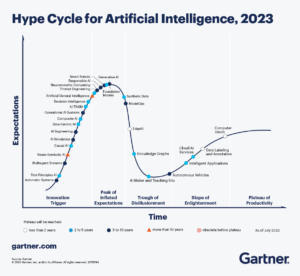
With the explosion of Gen AI in the past couple of years, everyone is trying to get on the AI bandwagon. But in my humble opinion, the word intelligence used here is not the cognition or understanding that we term intelligence as, but rather it is a lot of information and based on that the computer will make some decisions. It indeed reduces a lot of workload, but I would strongly urge to stop using AI in every conversation or marketing collateral but rather focus on actually solving the problems and make human lives better. According to a 2023 Gartner report, only 6% of companies using ‘AI-powered’ solutions are deploying what experts would classify as advanced machine learning or artificial intelligence. The graphic in the report is very illuminating with GenAI being at the top of "Peak of Inflated Expectations".

Using AI in everything creates unrealistic expectations in people's minds. Rather than contributing to the AI hype, companies should be transparent about what their technologies actually do — whether it's data-driven automation or advanced machine learning. This will help set realistic expectations and foster trust in the potential of AI to truly improve human lives in meaningful ways. The customer should also be aware of the marketing techniques and really try to peel the layers of the solution being sold to understand what they are buying.

Verified by MonsterInsights